

The Panorama Factory 5.1
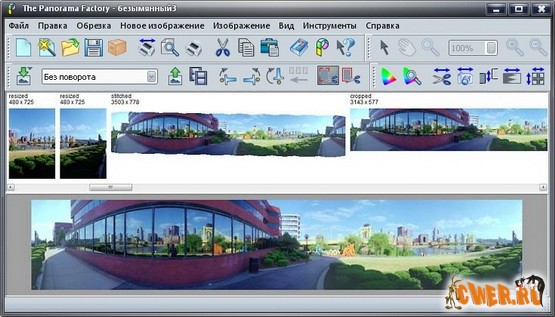
The Panorama Factory –Это программа для создания панорамных видов из цифровых фотографий. Построенный по принципу пошагового Мастера, пользовательский интерфейс The Panorama Factory не выстраивает фотографии автоматически, а позволяет подобрать экспозицию с помощью инструмента Blending Properties, чтобы выровнять яркость различных изображений, образующих панораму.
Программа многоязычна, в том числе поддерживается и русский язык. Кроме того, пользователю предлагается подробная справочная система, которая пошагово подскажет, что нужно сделать.
Программа имеет два интерфейса — Мастеров и классический интерфейс. Первый отлично подходит для начинающих пользователей. Здесь пошагово выполняются все операции, и приводится их подробное описание. После того, как вы изучите основные настройки, переходите во второй интерфейс. Сшивка изображений может быть произведена в автоматическом, полуавтоматическом и ручном режимах. Вы можете выбрать линзу, автоматическое повышение резкости и коррекцию экспозиции. Панорамы в программе могут быть частичными (180о) или 360о. Можно выбрать проекцию — сферическую, цилиндрическую или перспективную. После этих настроек программа сшивает панораму. Если результат не удовлетворил, можно вернуться на любой шаг и изменить настройки.
Easy to use:
Runs on Windows and Mac.
A Wizard helps you create new stitching projects with just a few mouse clicks.
Automatic detection of focal length.
Detection of camera rotation and tilt.
Easy rotation of imported images.
Includes a library of over 800 digital camera models including digital SLRs.
Available in Catalan, Chinese-Simplified (incomplete translation), Chinese-Traditional, Czech, Dutch, English, French, German, Hungarian (incomplete translation), Italian, Polish, Russian, Slovak (incomplete translation), Spanish. Online help is "bilingual" (commands, buttons, etc. in the local language with explanations in English).
Chinese language translations require the x64, m32 or Mac Edition.
Lets you save user preferences for all applicable dialogs.
Attention to image-quality issues:
Includes automatic and manual "de-ghosting" tools.
Automatically or manually correct barrel distortion and brightness falloff.
Support for immersive virtual reality:
Output to QTVR, IVR, PTViewer or HTML image map format.
Use hotspots to create virtual tours by hyperlinking from one VR image to another.
Import existing VR images in order to edit and re-export them in other formats.
Create web pages from pre-defined templates or templates you create yourself.
Create thumbnail index web pages.
True full color support:
Accepts 24-bit and 45-bit color images (15 bits each for red, green and blue).
Supports color managed workflows including conversion to working color space.
Reads and writes Windows BMP, JPEG, TIFF and PNG images.
Exports to layered Photoshop image format.
Optionally maintains full 45-bit data until final image output at 24-bits.
Can work from positive or negative images.
Includes a convenient and intuitive color correction tool.
Trims images from negative strips with a semi-automatic corner finding tool.
Fast, high-quality image processing engine:
Focal-length refinement.
Image overlap from 1-99%.
Automatic image alignment with manual override.
Bicubic image sampling is used to maintain image quality.
Image rescaling with Lanczos2 filtering – perfect for creating thumbnail images.
Multi-threaded execution on multi-processor systems, including multi-core systems (requires Windows XP, 2003 or Vista).
64-bit processor support (requires the x64 Edition of Windows XP, 2003 or Vista).
Batch processing version available for bulk panorama renderings.
Customer support:
Printable user guide in PDF format.
Troubleshooting guide and frequently asked questions.
Comprehensive online help pages.
Dedicated support forum.
Free updates for minor versions (e.g.: V5.1 is a free update for owners of V5.0.)
Project-file organization:
Allows you to change intermediate images without starting over.
Enables archival storage with reduced disk space.
OS:Windows 98, ME, NT, 2000, XP, 2003, x64 or Vista; Mac OS X 10.3.9 or newer.
Интерфейс:русский
Скачать The Panorama Factory 5.1 (7.9 МБ):


